Strix Talon
Strix Talon is a free, open-source per-app outbound firewall and egress monitor for Windows and Linux that shows which application talks to which remote address in real time and lets you block any app or address — or all egress — enforced through your OS's own firewall, with no kernel driver.
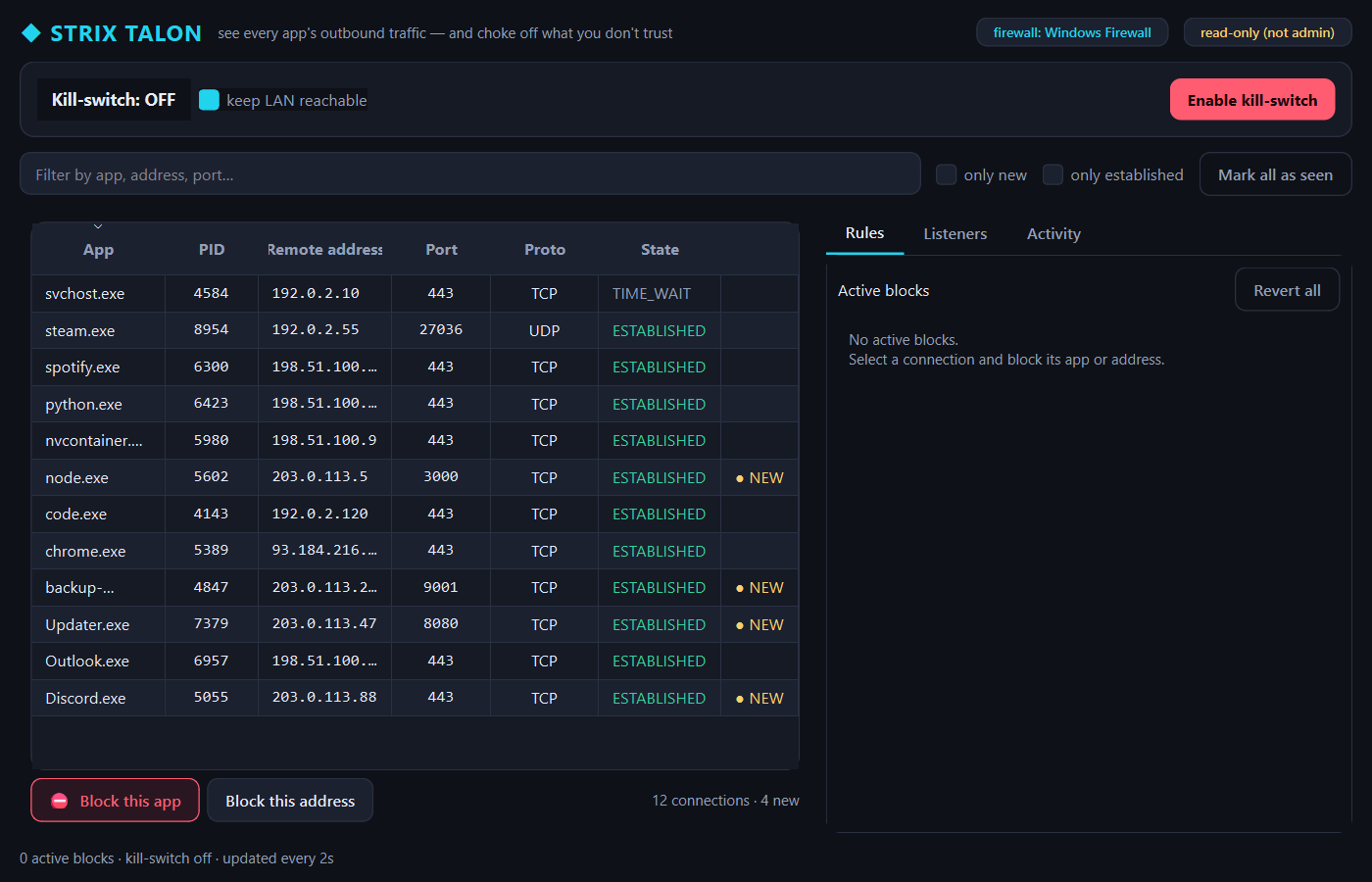
Strix Talon is a live, per-process egress map: which application is talking to which remote address and port, refreshed once a second, with brand-new destinations flagged the moment they appear. On top of the read-only visibility sits an optional rules layer — “this app may never touch the internet”, “block this address”, and a global kill-switch that cuts all outbound traffic except loopback (optionally keeping your LAN). Crucially, Talon ships no kernel driver: every rule is translated into the OS's own firewall — Windows Defender Firewall via netsh, Linux via a private nftables table — and named so it can be reverted in one click without ever touching your existing rules. It also surfaces local listening sockets, so you see inbound exposure and outbound chatter in one view.
- Price
- Free — open-source (MIT)
- Platforms
- Windows, Linux
- Category
- Security
- Built with
- Python
- Open-source alternative to
- Little Snitch (macOS, paid), GlassWire (closed-source), OpenSnitch (Linux)
- Telemetry
- None — fully offline
- Updated
A look inside
What it does
- Live per-app outbound map: app → remote IP/port/state, refreshed every ~2s, new destinations highlighted
- Block an app (Windows) or an address (all platforms), plus a global kill-switch (block all egress except loopback)
- Enforced through your OS firewall (Windows Defender Firewall / nftables) — no kernel driver to trust or sign
- Every rule is namespaced and one-click revertible — Talon never touches your existing firewall rules; loopback is never blocked
- Sees inbound exposure too (listening 0.0.0.0 vs 127.0.0.1); modern PySide6 GUI on Windows + a `talon` CLI on Linux
What Strix Talon deliberately does not do
- It ships no kernel driver — it drives your built-in OS firewall (Windows Defender Firewall / nftables).
- It does not show live allow/deny connection pop-ups in v1.
- Per-app blocking is Windows-only; on Linux it blocks by destination address.
Installation
🪟 Windows
Download the setup wizard and run it — Start-Menu shortcuts and an uninstaller are created for you.
🐧 Linux (Ubuntu / Debian)
sudo apt install ./strix-talon_1.0.0_all.deb
strix-talon
Frequently asked
How is this different from Little Snitch or GlassWire?
Talon is open-source, zero-telemetry, and runs on Windows AND Linux (Little Snitch is macOS-only and paid; GlassWire is closed-source). Crucially it delegates enforcement to your built-in OS firewall instead of shipping a kernel driver, and every rule is a plain, auditable firewall entry you can inspect and revert.
Can it lock me out of my own machine?
No. Loopback is always exempt, the kill-switch keeps localhost (and optionally your LAN) reachable, every rule is namespaced as StrixTalon-* / lives in a private nftables table, and one click (or `sudo talon revert`) removes everything Talon added without touching your other firewall rules. Note: live "allow/deny this new connection" pop-ups are out of scope for v1; per-app blocking is Windows-only (Linux blocks by address).
Powered by open source
Strix Talon maps sockets with psutil, builds its UI with PySide6, and enforces via your OS firewall — it shares no code with Little Snitch / GlassWire / OpenSnitch; they are credited only as inspiration.