Strix Pulse Monitor
Strix Pulse Monitor is a free, open-source desktop system-monitor widget for Windows and Linux that shows live CPU, GPU, RAM, disk and network usage in an always-on-top glass panel — offline, with no telemetry.
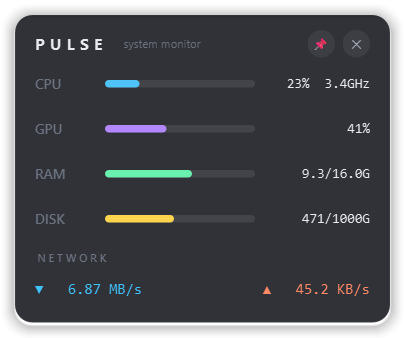
A sleek, frameless desktop widget that floats above your work and shows live CPU, GPU, RAM and disk usage alongside real-time network download and upload — refreshed every second. Drag it anywhere, pin it in place, or tuck it into the tray. No network access of its own, no telemetry.
- Price
- Free — open-source (MIT)
- Platforms
- Windows, Linux
- Category
- System
- Built with
- Python · PySide6
- Open-source alternative to
- Rainmeter (system skins), HWMonitor gadget, closed-source desktop widgets
- Telemetry
- None — fully offline
- Updated
A look inside
What it does
- Live CPU, GPU, RAM and storage load plus network throughput, once per second
- GPU readings from NVIDIA, Windows performance counters, or AMD sysfs on Linux
- Frameless glass widget you can drag, pin, or hide to the system tray
- Remembers its position; settings are validated and written atomically
What Strix Pulse Monitor deliberately does not do
- It phones home to nothing and collects no usage data.
- It is a live glanceable monitor, not a benchmark suite (see Strix Inspector for benchmarks).
- It needs no administrator rights to run.
Installation
🪟 Windows
Download the setup wizard and run it — Start-Menu shortcuts and an uninstaller are created for you.
🐧 Linux (Ubuntu / Debian)
sudo apt install ./strix-pulse-monitor_1.0.0_all.deb
strix-pulse-monitor
Frequently asked
Why does the GPU row show N/A?
Intel GPUs on Linux need privileged tooling, so the widget shows N/A rather than asking for root. NVIDIA and AMD are supported out of the box.
Can it start with my session?
Yes — on Windows add a shortcut to the Startup folder; on Linux run the installer with --autostart.