Strix Sinkhole
Strix Sinkhole is a free, open-source, offline hosts-file ad and tracker blocker for Windows and Linux that null-routes tracker, telemetry and ad domains system-wide — with no server like Pi-hole, no browser extension, and no DNS forwarding.
Strix Sinkhole safely manages your system hosts file to null-route known tracker, telemetry and ad domains to 0.0.0.0, so a lookup dies on your own machine before any request leaves it — no server like Pi-hole, no per-browser extension, no background daemon, and no network calls of its own. Everything it writes lives inside a namespaced block, so your own hosts entries and system defaults are copied byte-for-byte and never touched. A built-in guard refuses to blackhole critical infrastructure (OS update, certificate revocation/OCSP, time sync, localhost) no matter what any blocklist says, so it can never silently break your machine. Every change is preceded by a timestamped backup and is reversible in one click, with a dry-run diff of exactly what will change and an allowlist for false positives.
- Price
- Free — open-source (MIT)
- Platforms
- Windows, Linux
- Category
- Privacy
- Built with
- Python
- Open-source alternative to
- Pi-hole, browser ad-blocker extensions, editing StevenBlack/hosts by hand
- Telemetry
- None — fully offline
- Updated
A look inside
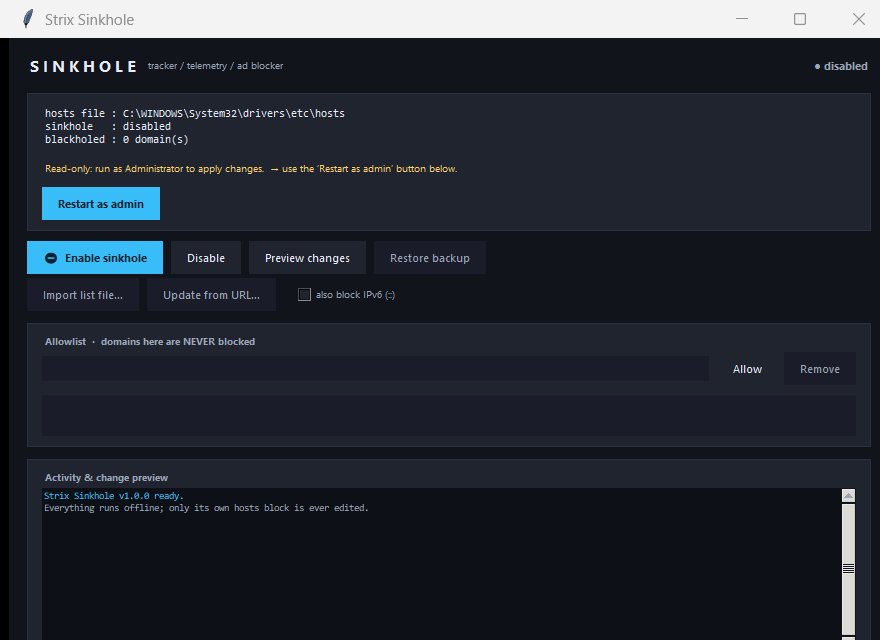
What it does
- Null-routes tracker / telemetry / ad domains system-wide via the hosts file — offline, no server, no extension
- Namespaced managed block: your own & system hosts entries are preserved byte-for-byte (verified before every write)
- Critical-domain guard: OS update, OCSP/CRL, time sync and localhost can never be blackholed by any list
- Timestamped backup before every write + one-click restore; dry-run diff preview; allowlist for false positives
- Curated seed list bundled; import your own or opt-in to a bounded HTTPS update; dark GUI (Windows) + `strixsink` CLI (Linux)
What Strix Sinkhole deliberately does not do
- It is not a Pi-hole-style DNS server and forwards none of your queries anywhere.
- It is not a browser extension — it edits a plain, auditable hosts file you can revert.
- It blocks at the hosts level; it does not encrypt your upstream DNS.
Installation
🪟 Windows
Download the setup wizard and run it — Start-Menu shortcuts and an uninstaller are created for you.
🐧 Linux (Ubuntu / Debian)
sudo apt install ./strix-sinkhole_1.0.0_all.deb
strixsink status
Frequently asked
How is this different from Pi-hole or a browser extension?
No separate server or Raspberry Pi (Pi-hole), and it is not a per-browser extension that can itself read your browsing — Strix Sinkhole edits a plain-text hosts file every technical user can audit and revert. Nothing runs in the background and nothing forwards your DNS queries anywhere.
Can a bad blocklist break my computer?
No. A built-in guard refuses to blackhole critical infrastructure (OS update, certificate revocation, time sync, localhost) regardless of what a list says, every change is backed up first, and one click restores the exact original. Note it blocks at the hosts level and does not encrypt DNS upstream.
Powered by open source
Strix Sinkhole ships only its own small curated seed and does not bundle these lists — it lets you import them, each under its own license. Thank you to the public blocklist ecosystem.