Strix MetaVault
Strix MetaVault is a free, open-source metadata remover and file encrypter for Windows and Linux that strips hidden EXIF/GPS and document metadata, then optionally locks your files inside an AES-256 encrypted archive — fully offline, with no accounts and no telemetry.
Every photo, document and PDF you share carries hidden traces — GPS coordinates, your name, the device you used, edit history. Strix MetaVault removes all of it, then optionally seals the cleaned files inside an AES-256 encrypted 7-Zip archive with hidden file names and a one-time random password. Fully offline, no accounts, no telemetry.
- Price
- Free — open-source (MIT)
- Platforms
- Windows, Linux
- Category
- Privacy
- Built with
- Python
- Open-source alternative to
- ExifTool GUIs, MAT2, online EXIF/metadata removers
- Telemetry
- None — fully offline
- Updated
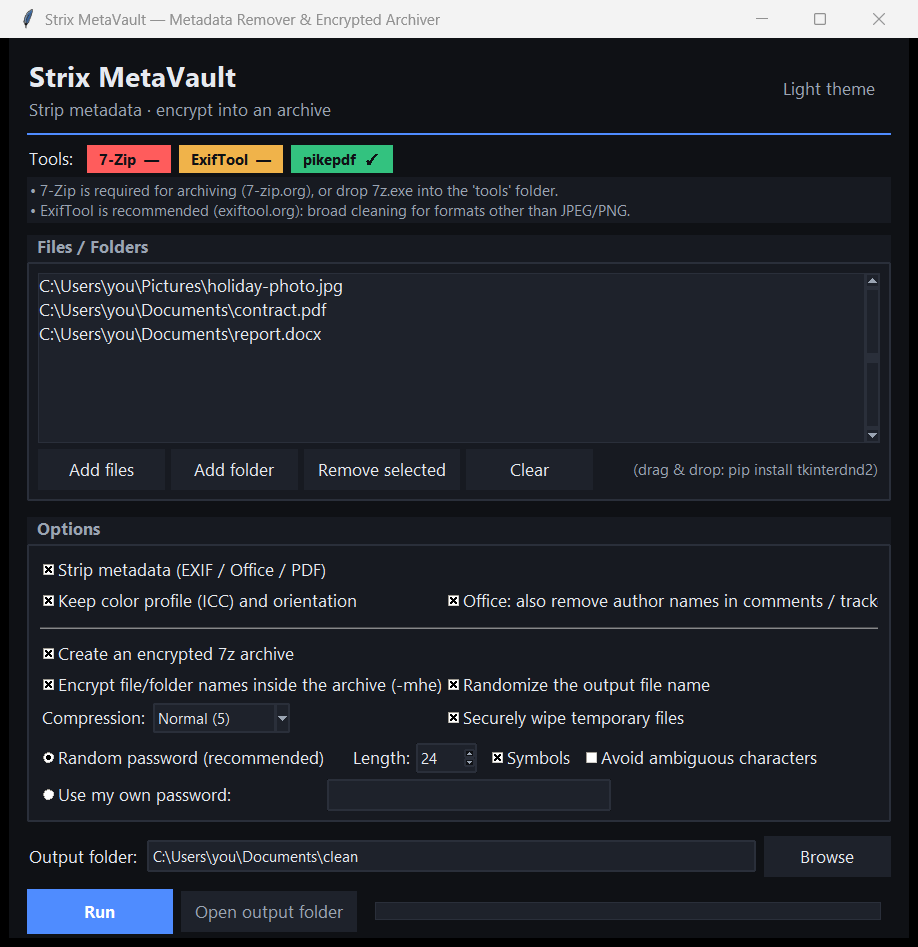
A look inside
What it does
- Strips EXIF, GPS, IPTC and XMP from images; author/company/history from Office and PDF files
- Optional AES-256 archive with encrypted file names and a randomized output name
- Generates a strong one-time password that is never written to disk or logs
- Refuses weak custom passwords; protected against symlink attacks and zip bombs
- Your originals are never modified — everything runs on copies
What Strix MetaVault deliberately does not do
- It never uploads your files — all cleaning happens locally, unlike online metadata removers.
- It does not roll its own crypto: encryption is delegated to vetted 7-Zip AES-256.
- It is not a cloud service and needs no account.
Installation
🪟 Windows
Download the setup wizard and run it — Start-Menu shortcuts and an uninstaller are created for you.
🐧 Linux (Ubuntu / Debian)
sudo apt install ./strix-metavault_1.0.0_all.deb
strix-metavault
Frequently asked
Does it work without 7-Zip or ExifTool?
JPEG and PNG are cleaned with the built-in engine. For every other format and for encrypted archiving, install 7-Zip and ExifTool (or drop them next to the app).
Can I recover a lost archive password?
No. The password is shown once and never stored. Save it in a password manager immediately — the encryption is genuinely unbreakable without it.